What is already done?
Tick off what you have completed. The page immediately shows what is still missing. Important: Du kannst den empfohlenen Varga-Tech Launcher/Chat nutzen, ohne Launcher einmalig den Web Mod-Sync im Browser verwenden oder komplett manuell nach Guide arbeiten. In allen Fällen dürfen nur die Varga-Tech Server-Mods aktiv sein.
You can now join the server. If there are problems, open Discord or the FAQ.
Alternative without launcher: manual mod installation
Use only these files
Wenn du den Launcher/Chat nicht nutzen möchtest, nutze den einmaligen Web Mod-Sync oder die manuelle Mod-Guide. Important: Es dürfen wirklich nur die Mods aktiv sein, die in der Varga-Tech Modliste für diesen Server stehen.
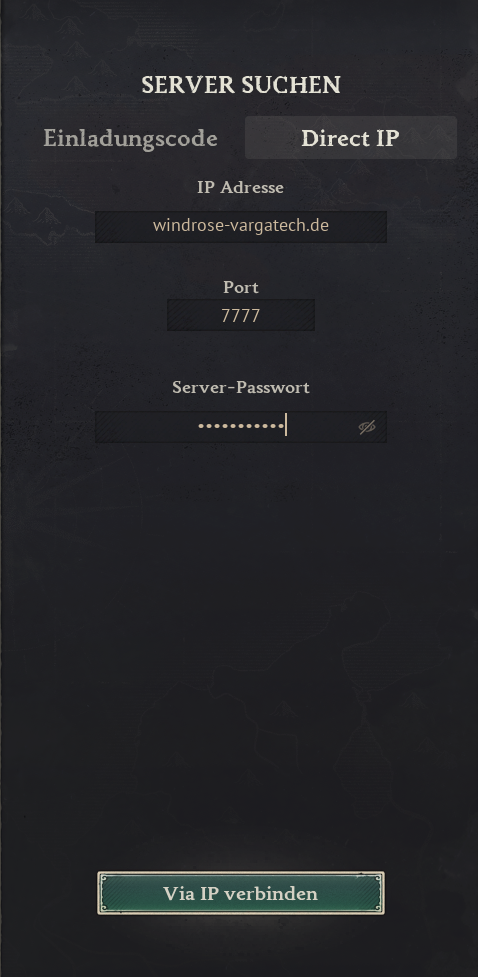
This is what Direct Connect looks like
Enter address and port in the fields. The password comes from verification.
If it does not work immediately
I do not have a password
You must first confirm the magic link from your email. After that, the password is shown.
I cannot join the MAIN mod server
Launcher/Chat starten, Web Mod-Sync nutzen oder manuelle Mod-Guide sauber prüfen, Domain und Port kontrollieren. Then test the backup IP. Wenn du ohne Mods spielen möchtest, nutze den anderen Vanilla Server mit Invite code vargatechvanilla.
My mods do not match
Nur die Varga-Tech Server-Mods verwenden. Zusätzliche, alte, fremde oder falsche lokale Mods entfernen. Ohne Launcher den Web Mod-Sync oder die manuelle Mod-Guide nutzen.
I need personal help
Open Discord and post player name, error message and screenshot.
Separate vanilla server: no mods, no launcher, no Web-Sync
Do you not want to use the MAIN mod server? Then you can join the separate Varga-Tech vanilla server directly in-game using the invite code. For that you need no Varga-Tech server mods, no Launcher/Chat and no browser sync.
Verification protects the server; mods must match exactly
Die Reihenfolge ist wichtig: Verification gibt dir das Password. Danach Launcher/Chat nutzen, den Web Mod-Sync verwenden oder die manuelle Mod-Guide befolgen. Direct Connect kommt erst danach.
More about the Windrose server
Internal links help visitors and search engines quickly find verification, connection, player profiles, live map and guides.