Einladungscode eingeben
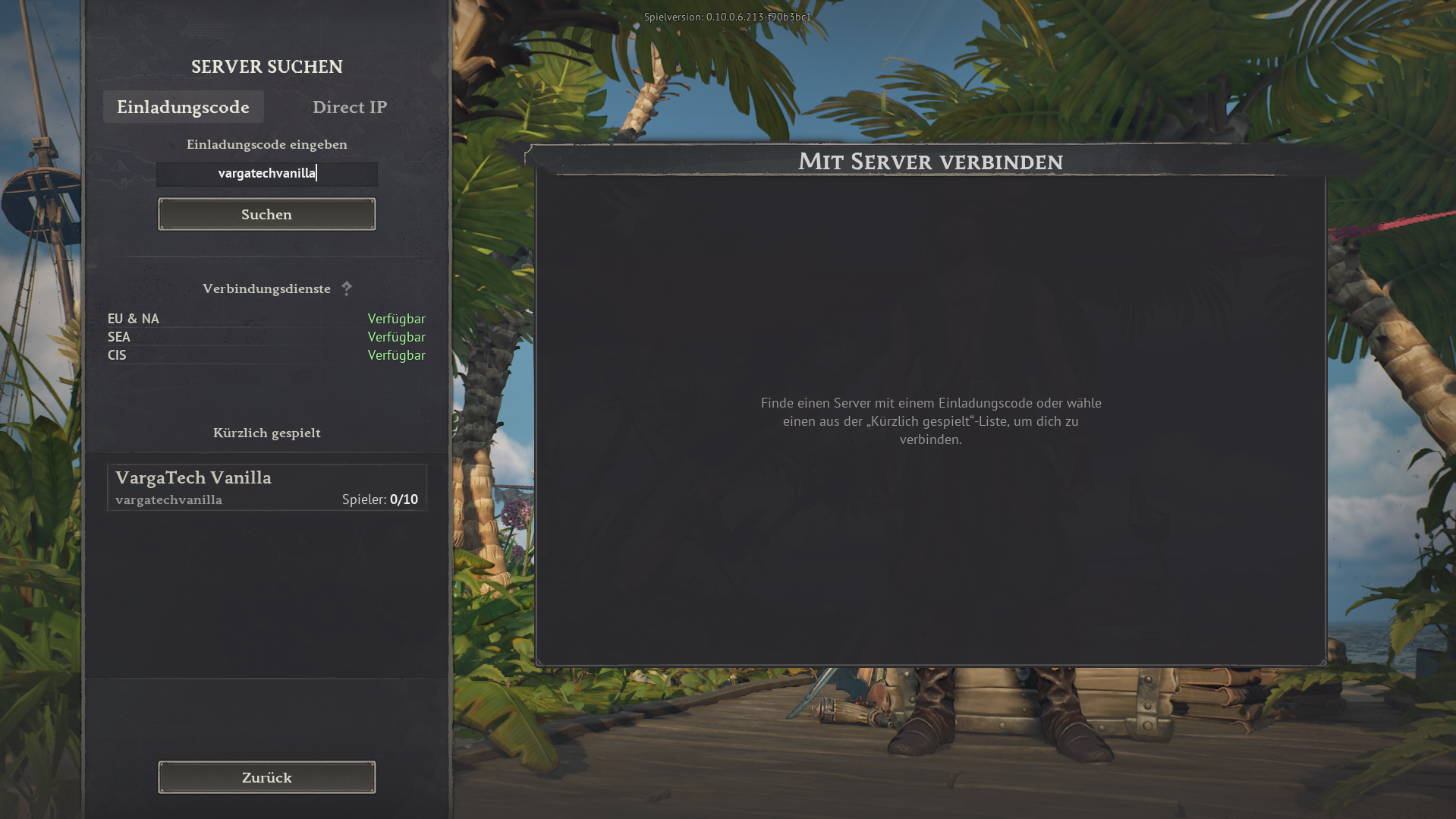
Öffne im Spiel die Serversuche, wähle den Tab Einladungscode, gib vargatechvanilla ein und klicke auf Suchen.
Wenn du einfach ohne Mods spielen möchtest, kannst du den separaten Varga-Tech Vanilla Server direkt im Spiel betreten. Dafür brauchst du keinen Launcher/Chat, keinen Web Mod-Sync und keine Varga-Tech Server-Mods.
Wichtig: Dieser Vanilla Server ist eine separate Varga-Tech Community-Option und nicht der MAIN-Mod-Server. Die Mod-, Sync- und Verify-Schritte gelten nur für den MAIN-Mod-Server.
vargatechvanilla
Im Spiel unter Server suchen → Einladungscode verwenden.
Der Vanilla Server ist für Spieler gedacht, die ohne zusätzliche Software und ohne Mod-Synchronisation starten möchten. Du trittst direkt im Spiel per Invitecode bei.
vargatechvanilla.Für den Vanilla Server sollten keine Windrose-Moddateien im lokalen Mod-Ordner aktiv sein. Wenn dort alte MAIN-Mods liegen, kann es zu falschen Inhalten, Ladefehlern, Crashes oder Verbindungsproblemen kommen.
R5\Content\Paks\~modsR5\Content\Paks\~mods. Wähle niemals R5\Content\Paks selbst. Backups dürfen ebenfalls niemals in R5\Content\Paks oder ~mods liegen, weil Windrose Dateien dort trotzdem lesen kann.Datenschutz: Dateinamen werden nur lokal im Browser angezeigt und nicht an den Server übertragen.
Das Tool läuft nur in deinem Browser. Du wählst den Ordner selbst aus. Ohne deine ausdrückliche Auswahl kann die Webseite keine lokalen Dateien sehen.
~mods. Für Backups wird ein Ziel außerhalb von R5\Content\Paks verlangt; direktes Löschen bleibt deaktiviert.Die Anzeige liest die lokal erzeugte Statusdatei des Varga-Tech Vanilla Servers. Sie ist datenschutzfreundlich und speichert keine IP-Adressen öffentlich.
Spielernamen werden nicht öffentlich angezeigt oder aktuell ist niemand erkannt.
Hinweis: Die Live-Anzeige basiert auf dem lokalen Varga-Tech Servermonitor und Docker-Logs. Kurz nach Neustarts kann sie einige Sekunden benötigen, bis alle Spieler erkannt sind.
Öffentlich angezeigt werden nur Anzahl, Allzeithoch und optional Spielernamen aus Serverlogs. IP-Adressen werden nicht veröffentlicht.
Zusätzlich zu dieser Anleitung kannst du den Vanilla Server auf der externen Windrose Serverlist öffnen. Je nach Verfügbarkeit werden dort Live-Informationen wie Online-Status, Spielerzahl, Votes oder weitere Serverdetails angezeigt.
Serverlist-Link: windrose-serverlist.net/servers/vargatech-vanillaHinweis: Die Serverlist ist ein externer Community-Dienst. Für verbindliche Hinweise, Datenschutz, Support und Anleitungen bleibt diese Varga-Tech Webseite die primäre Quelle.
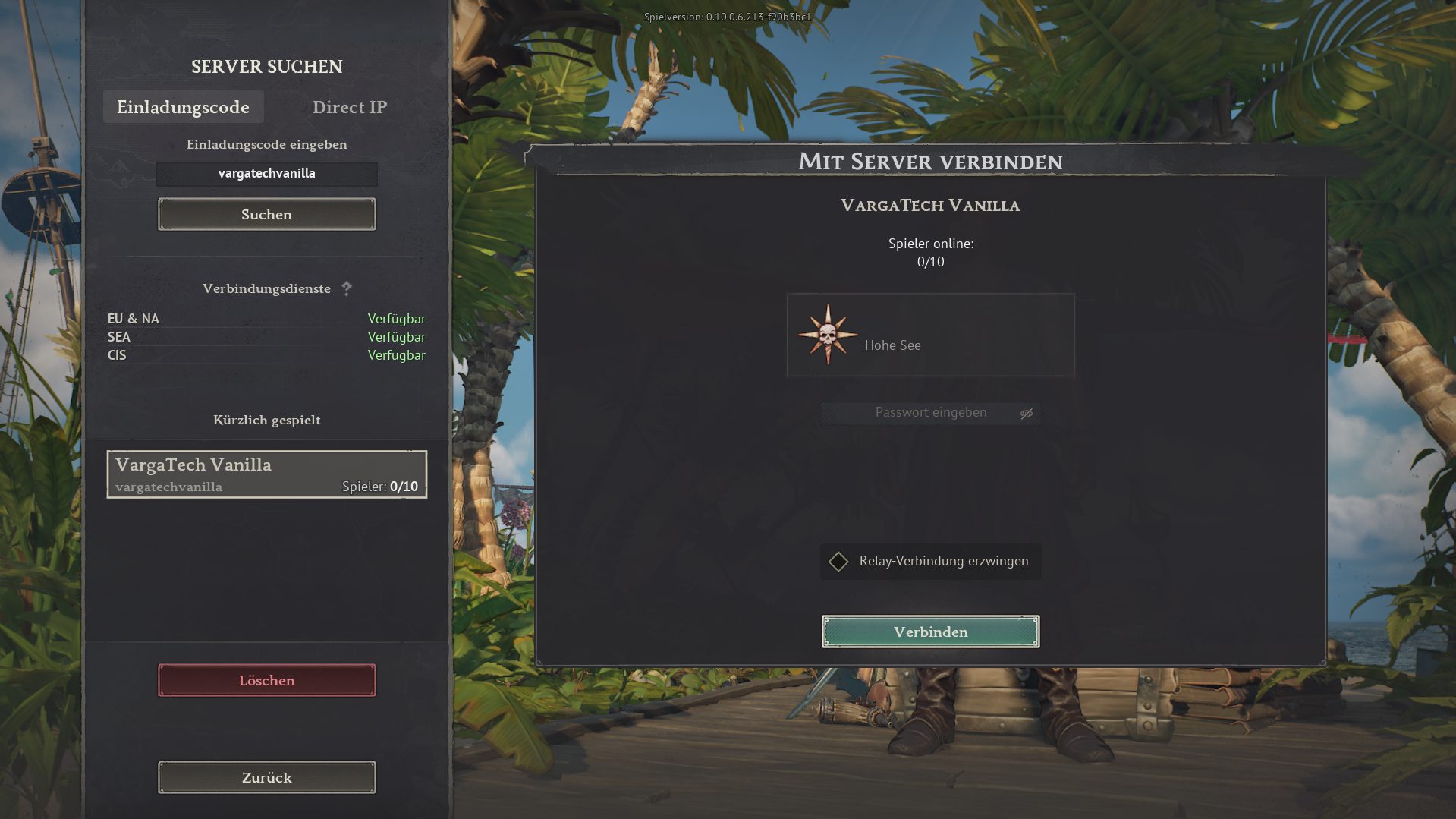
Die folgenden Bilder zeigen den Ablauf im Spiel. Der Invitecode ist immer vargatechvanilla.
Öffne im Spiel die Serversuche, wähle den Tab Einladungscode, gib vargatechvanilla ein und klicke auf Suchen.
Wähle den Eintrag VargaTech Vanilla aus. Danach erscheint die Verbindungsansicht. Klicke auf Verbinden.
Hier können Spieler sichtbar eine kurze Frage stellen, Mitspieler suchen oder Hilfe anbieten. Beiträge sind öffentlich und sollen freundlich, kurz und spielbezogen bleiben.
Für den Vanilla Server ist keine Varga-Tech Mod-Synchronisation nötig. Ob zusätzliche Spielregeln, Passwörter oder spätere Änderungen gelten, erfährst du auf Discord oder direkt über die aktuelle Serverinformation.
Der MAIN-Mod-Server ist die modifizierte Varga-Tech Server-Option. Dort müssen die Varga-Tech Server-Mods exakt passen. Dafür gibt es Launcher/Chat, Web Mod-Sync und manuelle Anleitung.
Verbindungsassistent öffnen